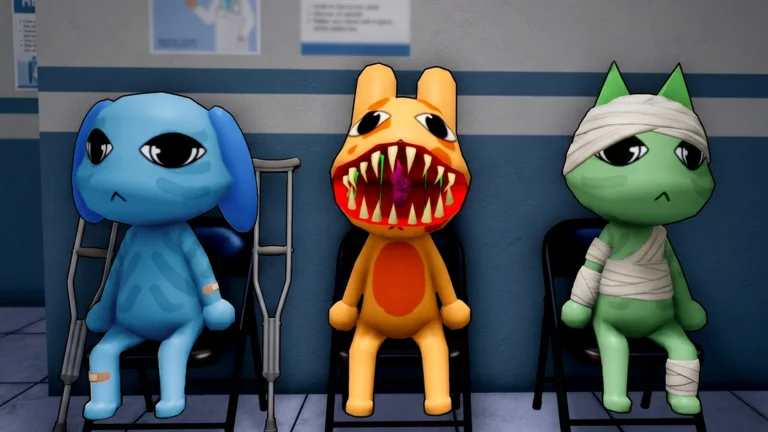
All 20 patient anomalies
The category tells you when the sign becomes visible. Reject the patient after one confirmed match instead of continuing to expose the room.
| Anomaly | Check | What changes | Decision |
|---|---|---|---|
| Twitching | Patient | The body makes repeated unnatural movements. | Reject. |
| Three Eyes | Patient | A third eye is visible on the face. | Reject. |
| Hollow Face | Patient | The face appears empty or hollowed out. | Reject. |
| Unnatural Grin | Patient | The mouth holds an exaggerated fixed grin. | Reject. |
| Human Teeth | Patient | The animal has clearly human-looking teeth. | Reject. |
| Wide Eyes and Sharp Teeth | Patient | Both enlarged eyes and pointed teeth appear. | Reject. |
| Wandering Eyes | Patient | The eyes drift independently or fail to track normally. | Reject. |
| Incorrect Photo | Photo | The developed image does not match the patient. | Reject. |
| Different Eyes | Photo | The eyes in the photo differ from the animal in front of you. | Reject. |
| Different Ears | Photo | Ear shape or placement changes in the photo. | Reject. |
| Unnatural Photo | Photo | The developed image contains an impossible distortion. | Reject. |
| Static Photo | Photo | Static replaces or obscures the expected image. | Reject. |
| Cursed Photo | Photo | The developed result shows an overt cursed form. | Reject. |
| Unnatural Body | CCTV | The camera shows an impossible body shape or posture. | Reject. |
| Staring at Cameras | CCTV | The patient turns its attention directly toward the cameras. | Reject. |
| Void Body | CCTV | The body appears as a dark or empty silhouette. | Reject. |
| Black Bar Eyes | CCTV | A dark bar covers the eyes in the camera view. | Reject. |
| Camera Mismatched Ears | CCTV | The ears differ only when viewed on camera. | Reject. |
| Camera Twitching | CCTV | Twitching appears in the feed even if the room view looks calm. | Reject. |
| Skinwalker | CCTV | The camera reveals the patient’s disguised form. | Reject. |
Fast inspection order
Use the same sequence on every patient so one category is never skipped.
| Step | Action | Do not |
|---|---|---|
| 1. Secure the room | Keep the shutters closed while inspecting. | Open the treatment side early. |
| 2. Read the patient | Check face, teeth, eyes, ears, and repeated movement. | Judge a single animation frame. |
| 3. Develop the photo | Wait for the image to finish before comparing details. | Call an unfinished grey image Static. |
| 4. Check CCTV | Cycle the relevant feeds and compare the same features. | Assume a clean room view guarantees a clean camera view. |
| 5. Decide once | Reject on one confirmed anomaly; admit only after all checks pass. | Keep exposing the room after the answer is known. |
Start every Animal Hospital check the same way
A fixed order is faster than chasing whatever looks strange first. Secure the shutters, inspect the patient, develop the photo, then use CCTV. This also makes it obvious which step was missed after a bad decision.
Normal patients can still blink, move, or look unusual under the room lighting. Confirm the named sign rather than rejecting an animal because one frame felt unsettling.
Seven anomalies visible on the patient
Twitching and Wandering Eyes require a short observation rather than a still glance. Three Eyes, Hollow Face, Unnatural Grin, Human Teeth, and Wide Eyes with Sharp Teeth are direct visual mismatches.
Check eyes, mouth, and ears before looking at the overall silhouette. Small facial changes are easier to miss when the whole model is moving close to the shutters.
Seven anomalies found through CCTV
Unnatural Body, Staring at Cameras, Void Body, Black Bar Eyes, Camera Mismatched Ears, Camera Twitching, and Skinwalker belong to the camera pass. A patient may appear normal through the shutters and fail only here.
Use the feed to re-check the same anchors: body shape, eye area, ears, movement, and attention. If one feed is obscured, wait for a readable view before opening either door.
Patient anomalies are not the hospital enemies
Current guides separately identify hazards such as the Stalker, Ghost, Bed Monster, Mass of Eyes, Hiders, Head Banger, Mimic, Tendril, and Camera Figure. Those encounters change how the shift is survived; they do not expand the 20-item patient checklist.
Keeping the two systems separate matters when a guide says there are more than 20 “anomalies.” That larger total usually combines patient diagnoses, enemies, and special characters into one number.
Methodology and limits
The 20-item patient list and three inspection categories were compared across two current anomaly guides, then enemy names were checked against a broader monster guide and the live Roblox experience. Descriptive wording is normalized here, but the in-game visual remains the final check when an update changes a model.
Sources checked for this update
These sources were reviewed on 2026-08-22. Rankings and recommendations are our synthesis, not official grades from the developer.
- Animal Hospital (Anomaly) on Robloxofficial · 2026-08-22
- Current 20-patient anomaly checklistcross-check · 2026-08-22
- Second patient anomaly comparisoncross-check · 2026-08-22
- Enemy and monster separation checkcross-check · 2026-08-22
Animal Hospital (Anomaly) guide FAQ
How many patient anomalies are in Animal Hospital?
Current guides agree on 20 patient anomalies: seven visible on the patient, six in the photo, and seven on CCTV. Enemy encounters are counted separately.
What order should I check Animal Hospital anomalies?
Keep the shutters closed, inspect the patient and movement, develop and compare the photo, then check CCTV before choosing a door.
Is the Stalker one of the 20 patient anomalies?
No. The Stalker is a shift enemy. It is not one of the 20 signs used to diagnose the patient at the shutters.
Why did a normal-looking patient fail my check?
Some anomalies appear only in the developed photo or CCTV. A clean direct inspection is only the first of three checks.